
Post a Bullion Listing
List live-priced bullion with spot-based or fixed wholesale pricing — optional delist floor protects spot-linked lines.
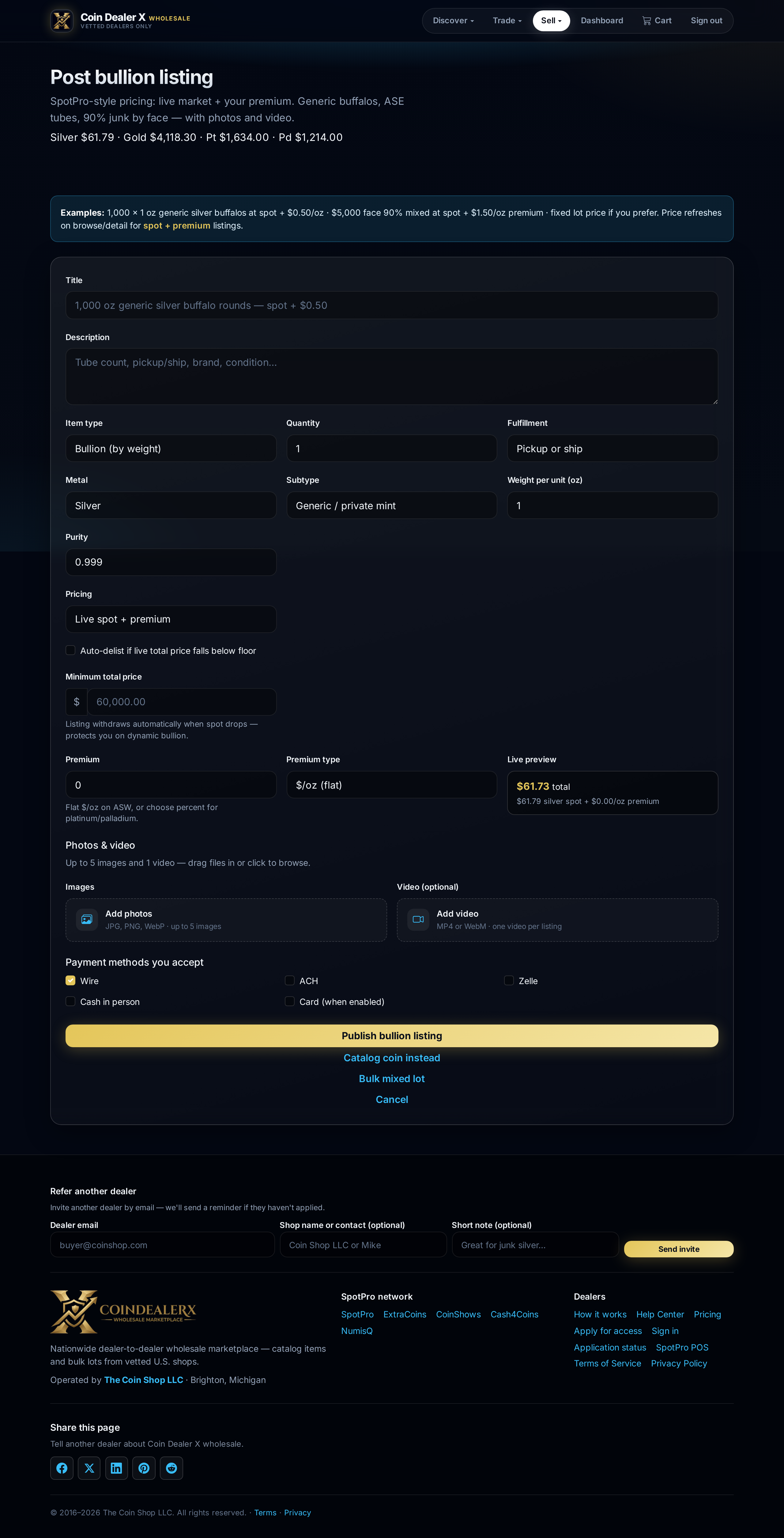
Step-by-step instructions
1 Open Post bullion
From the top nav: Sell → Post bullion (requires sell permission).2 Enter product details
Choose metal, weight, purity, and product type. Add title, description, and photos. Set wholesale price as Live spot + premium or a fixed total. The live preview box updates as spot moves.3 Set delist floor (spot + premium only)
When pricing is Live spot + premium, check Auto-delist if live total price falls below floor and enter a Minimum total price in dollars. This is the floor for the entire listed quantity — not per ounce or per coin. Example: 100 oz silver offered wholesale with a $2,500 floor withdraws automatically if live total value drops below $2,500. Fixed-price and make-offer listings do not use the floor. Full detail: Delist floor protection.4 Set quantity and minimums
Enter available quantity and minimum order quantity for wholesale buyers.5 Publish
Save to publish. The listing appears on Browse and your dealer storefront. For POS-linked items, prefer List from SpotPro inventory to keep stock unified — you can set the same floor in SpotPro Post/Update or the Also list on CDX checkbox.